Keep this handy at the table
Quick scoring reference
- Wait until every quilt is filled and leave patches in place.
- Count coloured buttons and mark the rainbow button separately.
- Sort cats into point values 3, 5, 7, 9 and 11.
- For each design goal choose zero, its blue circle or its yellow circle.
Checking the finished quilt
The game ends when players have filled their quilt boards with patches. Leave tokens and fabric in place because cat and design-goal conditions depend on exact placement. Verify that rewards earned during play follow the rules. The calculator receives the results of that check, so it cannot automatically correct a token awarded for an invalid group.
First identify the three cats used in this session and their favourite patterns. Next check buttons by colour, then examine the central design goals. Keeping these checks separate avoids mixing their properties. A patch can help through both its colour and pattern, but each particular reward must still be evaluated according to its own condition.
Regular and rainbow buttons
A regular button is earned for a qualifying group of at least three patches of one colour. Every colour scores three points. Expanding the same group to six patches does not automatically earn another button; that requires a separate group. Printed border patches can help satisfy conditions, so do not exclude them merely because they were not drawn from the bag.
Earning buttons in all six colours also awards a rainbow button. It scores three points and counts as a button for tiebreaking. Enter regular buttons without the rainbow token, then mark that token separately. Entering seven regular buttons plus a rainbow when only seven tokens exist on the quilt would award one button twice.
Cats score by value rather than group size
Each earned cat token scores the value printed on its scoring tile: 3, 5, 7, 9 or 11. Do not multiply that value by the number of patches in its pattern area. Two seven-point cats score fourteen regardless of the exact number of qualifying patches used to attract them. Verify the tokens first, then multiply their count.
Different cats require different group sizes or a particular shape. Follow the chosen cat’s preferred pattern and the rules for separating already scored areas. The calculator groups tokens by value because their names are unnecessary for addition. Preserve token counts separately from their points: the number of cats, rather than the value of their type, is the first tiebreaker.
One circle per design goal
Each design goal examines its six surrounding patches. Its condition can be met by colours, patterns or both. Meeting only one property scores the blue value. Meeting both scores the yellow value instead of blue. Meeting neither scores zero. Do not combine partial progress across different properties and treat that mixture as one completed requirement.
Read values from the particular goal tile because different distributions score differently. The form lists possible values, but your tile determines which circle values are valid. The entered number is the chosen award, not a count of surrounding spaces. Family mode flips goals face down and does not score them, so all three entries remain zero.
Worked example: a 59-point quilt
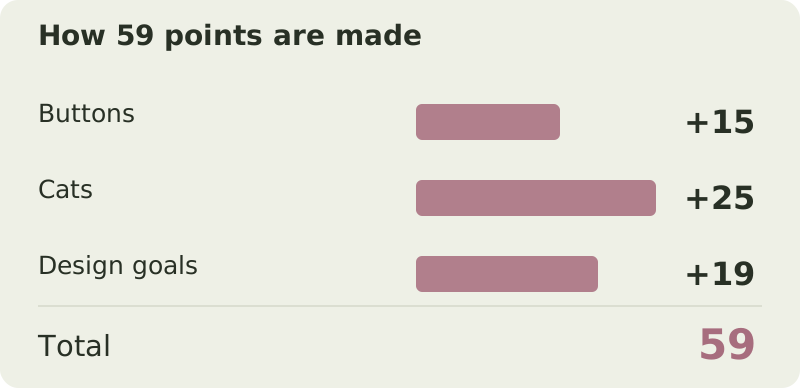
The quilt has five regular buttons and no rainbow, scoring 15. It attracted two three-point cats, one five-point cat and two seven-point cats: 6 + 5 + 14 = 25. The first goal scores blue 8, the second yellow 11, and the third is unmet. Goals add 19, producing 15 + 25 + 19 = 59 overall.
This example has five cat tokens even though their points total twenty-five. If another player also scores 59 but has four cats, our player wins. Compare buttons only if cat counts tie. Equal point totals, cat counts and button counts mean shared victory, with no additional comparison of individual patterns or central design goals.
Entering counts and values
Enter regular buttons 5 and rainbow 0. For cats worth 3, 5 and 7, enter counts 2, 1 and 2 respectively. Leave higher-value cats at zero. Choose goal values 8, 11 and 0. Do not enter the 25-point subtotal as a cat count because the form would multiply it again. Both tiebreak quantities are derived automatically.
Family mode and achievements
Beginner and standard setup choose cats and goals differently but share the same addition method. Family mode scores buttons and cats only. Scenarios can require particular rewards or change achievement conditions; check those requirements separately. An ordinary point total alone does not prove that a scenario was passed or that a special restriction was satisfied.
Avoiding duplicate awards
- The yellow circle replaces blue rather than adding to it.
- Enter the rainbow button separately from regular buttons.
- A large pattern area does not award an arbitrary number of cats.
- Tiebreakers compare token counts, not the point values of chosen cat types.
Try it yourself
Try the example with your own numbers
Change the values to see how the score changes. This is a practice calculation; your saved game in the calculator is kept separately.
Questions & answers
Do yellow and blue circles both score?
No. Choose one award: yellow for completing both properties or blue for one. If the requirement is unmet, the goal scores zero.
Does the rainbow button count in a tie?
Yes, it is included in total button count. Compare cat counts first, however, because cats are the first tiebreaker after equal victory points.
Sources and verification
Prepared by Board Game Scoreboard. Rules checked against the sources below on November 17, 2026; the worked example is checked during each site build. If editions differ, follow the rulebook included with your copy.
How we prepare our guidesReady to score your game?
Enter each player's results to see the total and a full breakdown.
Go to calculator ↗