Keep this handy at the table
Quick scoring reference
- Wait until every player has finished playing.
- Add printed points on all cards in your city.
- Calculate the extra scoring conditions on purple cards separately.
- Add VP tokens, Events and occupied Journey spaces.
When to start final scoring
One player may finish their actions before the others. This does not make everyone score immediately: players still playing finish their turns first. Begin scoring once everyone has finished.
Keep your city, achieved Events, VP tokens and workers on Journey spaces in place. Use the same order for everyone: cards, Prosperity, tokens, Events, Journeys. Give each player a scoring row so you can check a disputed award without recounting the city.
Start with printed card points
Review every card in your city and add its printed VP. Any card color can have a printed value. Include both constructions and critters, including purple Prosperity cards.
Cards in hand or discard are not part of your city. A card tucked under another card does not contribute its printed value merely because it lies nearby. If an effect scores tucked cards, score that effect rather than the hidden cards' printed points.
Include negative printed values as deductions. State the subtotal clearly, such as “My printed card values total 27.” Return to extra conditions in a separate pass.
Scoring purple Prosperity cards
A Prosperity card has a printed value and an additional end-game condition. Its printed value is already in your card subtotal. Now read its condition and add only the variable bonus for qualifying cards, Events or other specified items.
If your purple cards' conditions award 4 and 6 extra points, enter 10 under Prosperity bonuses, even if the cards also have printed points. Do not include those printed values in the ten again.
| Part of the card | Where to record it |
|---|---|
| Printed VP value | In the total for city cards |
| Conditional end-game bonus | In the separate Prosperity total |
| VP tokens received earlier | In your token total, if already awarded |
Tokens, Events and Journeys
Count VP tokens by value, rather than by the number of discs. Two 3-point tokens and four 1-point tokens score 10. Twigs, resin, pebbles and berries have no general point conversion; count them only where an effect explicitly requires it.
Score Events you achieved using their own conditions. Record the Event count separately for tiebreaking. The number of Events and their total point value are different inputs.
For Journeys, add the values of spaces occupied by your workers. One worker on a 4-point Journey and one on a 2-point Journey score 6. Cards discarded to send a worker do not add their printed points on top.
Worked final score: 62 points
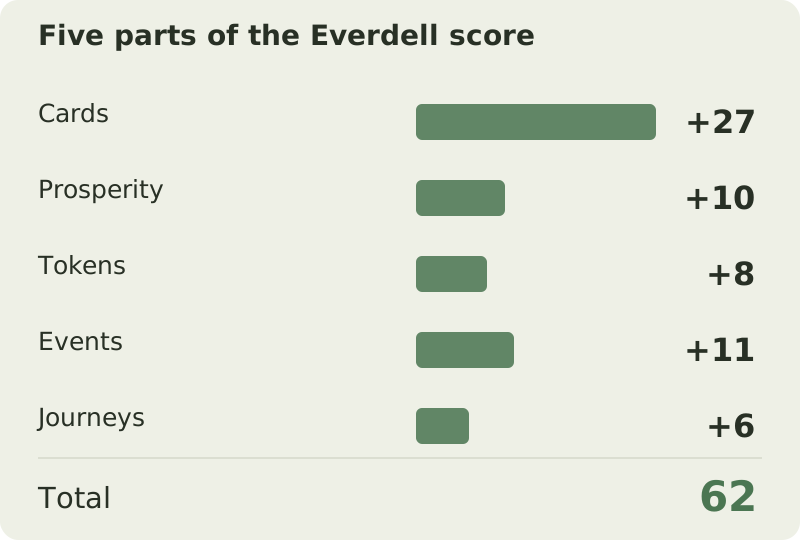
Sophie's city cards have 27 printed points. Extra Prosperity conditions score 10. Her tokens are worth 8, Events 11 and two Journeys together score 6. These figures belong to five separate, non-overlapping categories.
Cards and Prosperity give 27 + 10 = 37. Tokens bring that to 45, Events to 56 and Journeys to 62. Announcing subtotals in order helps another player check the calculation and locate any disagreement.
| Category | What was counted | Points |
|---|---|---|
| City cards | Printed values only | 27 |
| Prosperity | Extra conditions only | 10 |
| VP tokens | Total token values | 8 |
| Events | Total Event awards | 11 |
| Journeys | 4 + 2 | 6 |
Work it out27 + 10 + 8 + 11 + 6 = 62 points
Breaking a tie
If final points tie, first compare achieved Event counts. More Events wins. A high-value Event does not count as several Events: count the number achieved.
If Event counts are tied, compare total remaining resources. Two twigs, one resin and three berries mean 6 resources. VP tokens and cards in hand are excluded. Keep resource supplies in place until rankings are settled.
Entering the score in the calculator
For this example, enter Printed card points 27, Prosperity bonuses 10, VP tokens 8, Events 11 and Journeys 6. The result is 62. These fields take points already calculated; Events does not take the number of Event cards.
Enter Event count in its separate tiebreaker field, along with remaining resources. The calculator adds categories but does not read card text or verify Prosperity conditions. Resolve each card yourself, then enter its bonus.
Including expansions
Expansions may introduce their own components, categories and conditions. This guide covers the base score sheet and does not replace expansion rules. List expansion awards separately first and check which have already been represented by tokens or existing categories.
Do not automatically use this calculator for another standalone Everdell game: similar artwork does not imply identical final scoring.
Common mistakes
- Counting a purple card's printed points twice. Printed values go under cards; extra conditions go under Prosperity.
- Adding all cards in hand. They are not city cards in normal scoring.
- Confusing Event count with Event value. Points contribute to the score; count breaks ties.
- Converting all leftover berries into points. Remaining resources have no general exchange rate.
- Counting tokens without checking denominations. A 3-VP token is worth three, not one.
Try it yourself
Try the example with your own numbers
Change the values to see how the score changes. This is a practice calculation; your saved game in the calculator is kept separately.
Questions & answers
Does a purple card score its printed points?
Yes. Add them to all city card points, then check its extra Prosperity bonus separately.
Should I add remaining resources to my score?
Not under the general rule. They may matter for specific effects and are the second tiebreaker.
Why didn't Event count increase my calculator score?
It is a tiebreaker field. Enter the point value of achieved Events separately under Events.
Sources and verification
Prepared by Board Game Scoreboard. Rules checked against the sources below on November 17, 2026; the worked example is checked during each site build. If editions differ, follow the rulebook included with your copy.
How we prepare our guidesReady to score your game?
Enter each player's results to see the total and a full breakdown.
Go to calculator ↗