Keep this handy at the table
Quick scoring reference
- Resolve end-game effects and final scoring cards first.
- Find your final appeal and conservation marker positions.
- Original scale: appeal minus the lower boundary of the conservation area.
- Updated scale: the same result plus 100. Player rankings stay the same.
Resolve all final scoring effects first
Markers meeting or crossing trigger the game end, but do not replace final scoring. Finish the remaining turns required by the rules. Then resolve end-game cards and final scoring cards, which may move appeal or conservation further.
Recording marker positions before these steps means adding changes again and risks mistakes. The calculator needs final values. If a card moves your conservation marker, do not then add its bonus directly to your victory points a second time.
Why you cannot simply add the two tracks
Conservation steps and appeal points have different values on the shared board. The conservation marker identifies an area spanning several appeal values. Convert that area into an appeal-track value before comparing players.
In original scoring, find the lowest appeal value in the area containing your conservation marker. This is the threshold, or target number. Subtract it from final appeal. The result may be negative; that is a valid score, rather than an input error.
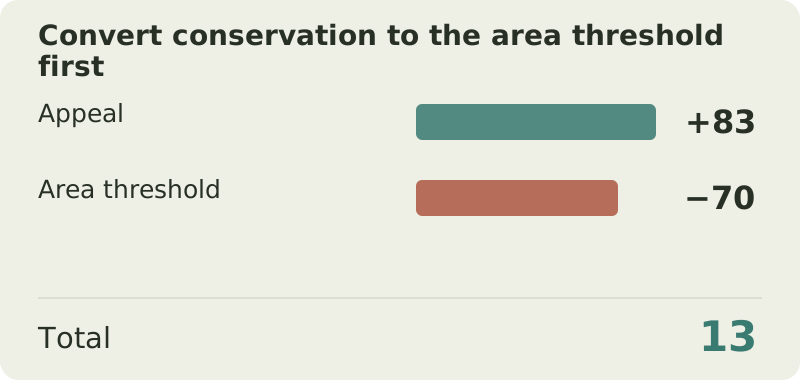
For example, 18 conservation corresponds to a threshold of 70. With 83 appeal, you score 13 VP. Adding 83 + 18 = 101 is not the original scoring calculation.
Finding your conservation area's threshold
At the table, read the area on your own board. The checkpoints below help verify it and show why moving one conservation step does not always add the same number of points.
The calculator converts the position automatically. Up to and including 10 conservation, the threshold is 114 minus twice the steps. Above 10, it is 124 minus three times the steps. This formula is useful for checking; you do not need to memorize it before playing.
| Conservation steps | Original area threshold | Updated scale adjustment |
|---|---|---|
| 0 | 114 | −14 |
| 10 | 94 | 6 |
| 11 | 91 | 9 |
| 18 | 70 | 30 |
| 20 | 64 | 36 |
| 41 | 1 | 99 |
Worked example: 83 appeal and 18 conservation
After final scoring cards, Oliver has 83 appeal and 18 conservation. The original board's conservation area threshold is 70, so 83 − 70 = 13 points. Under updated scoring, the same result is written as 13 + 100 = 113.
Compare Mia, who has 78 appeal and 20 conservation. The threshold at 20 is 64, giving her 14 under original scoring or 114 under updated scoring. Despite lower appeal, Mia wins 14 to 13. Both systems rank the players identically.
| Player | Appeal | Conservation | Original score | Updated score |
|---|---|---|---|---|
| Oliver | 83 | 18, threshold 70 | 13 | 113 |
| Mia | 78 | 20, threshold 64 | 14 | 114 |
Work it outOriginal: 83 − 70 = 13; updated: 13 + 100 = 113
What updated +100 scoring means
Updated boards show small white victory point values beside the conservation track. Add these to appeal. A white number is the converted scoring value of that position, rather than the number of conservation steps.
At 18 conservation, the white value is 30. So 83 + 30 = 113, equivalent to 83 − 70 + 100. Convert saved results to the same system before comparing editions: an original score of 13 and an updated score of 113 describe the same performance.
The constant 100-point addition does not make a zoo stronger or change the winner. It changes the notation. You cannot compare 90 in updated scoring with 10 in original scoring and declare the first zoo better without converting.
Breaking ties
For equal final scores, compare the number of conservation projects supported. You can check the relevant markers removed from the left side of each zoo board. Count project supports, rather than all conservation-icon cards or the points those cards earned.
If projects are also tied, share the victory. Money and reputation are not further tiebreakers under the base rule. The calculator has a separate supported-project field: it affects rankings without increasing the score.
What to enter in the Ark Nova calculator
Choose Original scale · difference or Updated scale · total. For Oliver, enter Appeal 83 and Conservation 18 to get 13 or 113 respectively. Do not enter 30 as conservation even if that white value appears on your new board: the calculator expects steps and converts them itself.
Enter supported project counts for tiebreaking. Apply other bonuses to the game tracks first. The calculator does not reconstruct your zoo, evaluate card conditions or infer final scoring from your animals. It checks the final arithmetic after you resolve those effects.
Expansions and solo play
Expansions may add ways to move markers and new final effects. Resolve them under your expansion's rules, then use final track positions. Do not add conservation again as a separate amount after moving the marker.
Solo play has its own ending sequence and victory requirement. This guide explains the zoo's numerical score. For solo, also check your edition's target: original scoring and scoring with the 100-point adjustment use different numbers.
Common mistakes
- Adding appeal to conservation steps. Convert conservation into its area value first.
- Using the upper area boundary. Original difference scoring uses the area's lowest appeal value.
- Entering a white scoring number as conservation. The calculator expects steps from 0–41.
- Counting a final card bonus twice: once by moving a marker and again in the total.
- Comparing different scoring scales directly. Add 100 to the original score or subtract 100 from the updated score.
Try it yourself
Try the example with your own numbers
Change the values to see how the score changes. This is a practice calculation; your saved game in the calculator is kept separately.
Questions & answers
Can an Ark Nova score be negative?
Yes, in original scoring. It means final appeal is below the conservation area's threshold. The calculator supports negative results.
Why did switching versions add exactly 100?
The updated system records the same result with a constant 100-point adjustment. Score differences and player rankings remain unchanged.
What should I enter if the board shows 30 beside 18 conservation?
Enter 18 under Conservation: the marker's position. The 30 is already the converted appeal adjustment for updated scoring.
Calculator profiles and fields
Check which inputs your version needs before you start. Quantity fields are converted into points automatically; points fields expect a score you have already worked out.
Original scale · difference
| Field | What to enter |
|---|---|
| Appeal | Final marker position after resolving all end-game cards. |
| Conservation | Final conservation marker position. |
| Supported projects | Number of supported projects, used to break ties. |
Updated scale · total
The result equals the original difference + 100. The updated board prints conservation scoring values directly; here, enter the number of conservation steps (0–41).
| Field | What to enter |
|---|---|
| Appeal | Final marker position after resolving all end-game cards. |
| Conservation | Final conservation marker position. |
| Supported projects | Number of supported projects, used to break ties. |
Sources and verification
Prepared by Board Game Scoreboard. Rules checked against the sources below on November 17, 2026; the worked example is checked during each site build. If editions differ, follow the rulebook included with your copy.
How we prepare our guidesReady to score your game?
Enter each player's results to see the total and a full breakdown.
Go to calculator ↗