Keep this handy at the table
Quick scoring reference
- Wait until both players reach the final time board space.
- Count remaining buttons by token value.
- Count empty quilt spaces and multiply by 2.
- Subtract the penalty, add 7 if you hold the special tile, and use finish order to break ties.
When is the game actually over?
The game ends when both time tokens reach the final space. If one player finishes first, the other continues their remaining actions. Finish movement and awards before applying the final formula.
Keep patches on quilt boards until you have checked empty spaces. Remember who reached the end first for tiebreaking. Place the 7 × 7 tile beside its owner so it is not confused with other components.
You need just three scoring figures: buttons, empty spaces and the bonus. A single row per player works well on paper. Unlike a detailed turn history, this is enough to verify an ordinary base-game result.
Which buttons become points?
Count buttons physically remaining in your supply, using token values. Two fives and three ones mean 13 buttons. Buttons spent on patches do not return to your score.
Button icons on patches determine income when passing the relevant time board spaces. They do not award income again at game end. Any final income already received is part of your remaining supply.
Sort tokens by denomination and record the total once. Use that figure when comparing results instead of recounting after each deduction. This makes it easier to identify whether an error came from buttons or empty spaces.
Counting empty spaces and the bonus
Check the 9 × 9 board row by row. Count uncovered spaces in each row, then add the nine subtotals. This helps catch isolated holes inside the quilt.
Every empty space costs 2 points, whether at the edge or in the middle. Two adjacent uncovered spaces cost 4; they are not one combined hole. Spaces covered by small leather patches are not empty.
The first player to completely cover a 7 × 7 square earns the special tile. It is awarded once and scores 7 only for its holder. The other player's completed square does not create a second bonus.
| Scoring component | How to score |
|---|---|
| Buttons remaining | Add the entire remaining total |
| Unused spaces | Subtract the count × 2 |
| 7 × 7 special tile earned | Add 7 once |
| Finish order | Used only to break a points tie |
Worked example: 32 buttons and 8 empty spaces
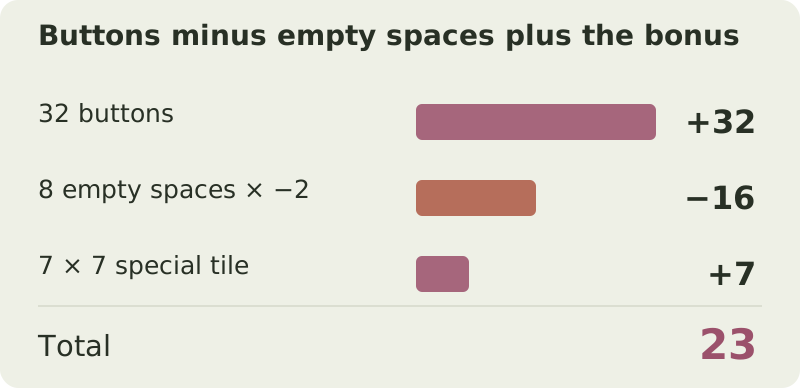
A player has 32 buttons remaining and counts 8 empty spaces across their rows. Earlier, they were first to cover a 7 × 7 square and claimed the special tile.
The penalty is 8 × 2 = 16. Subtract it from 32 to get 16, then add the tile: 16 + 7 = 23. You may change the arithmetic order, but include each category exactly once.
Their opponent has 35 buttons, 7 empty spaces and no bonus, scoring 35 − 14 = 21. Despite fewer buttons and more empty spaces, the first player wins 23 to 21 thanks to the tile.
| Category | Calculation | Points |
|---|---|---|
| Buttons | Remaining supply | 32 |
| Unused spaces | 8 × −2 | −16 |
| 7 × 7 special tile | 1 × 7 | 7 |
| Total | 32 − 16 + 7 | 23 |
Work it out32 − 8 × 2 + 7 = 23 points
Can the score be negative?
Yes. If the empty-space penalty exceeds buttons and bonuses, the result is negative. With 12 buttons, 10 empty spaces and no tile, the score is 12 − 20 = −8.
Do not replace a negative result with zero. If the opponent scores −11, −8 wins because it is higher. The minus sign means uncovered spaces outweighed accumulated buttons, rather than indicating a formula error.
What to enter in the Patchwork calculator
Enter Buttons remaining 32 and Empty spaces 8. Set the 7 × 7 special tile to 1 for its holder and 0 for the opponent. Do not enter the 7-point value; the calculator applies the multiplier.
First to the finish is used only for ties and awards no extra points. If both players score 23, the one who reached the final time board space first wins.
If the calculator differs from your manual total, check empty spaces first. Entering the penalty 16 instead of the count 8 makes it double again. Then check that only one player holds the special tile.
Which versions use this formula?
This guide covers the standard 9 × 9 board and normal 7 × 7 bonus. If your artwork differs, check the scoring rules themselves: different patch designs alone do not change the formula.
Standalone games and special scenarios may use other boards or conditions. The calculator handles the base formula, so check extra effects separately. Before your first game, confirm that your copy uses the same three scoring categories.
Easy mistakes to make
- Adding patch-icon income again. Final scoring counts buttons already earned and still unspent.
- Counting one hole instead of its individual spaces. Penalties depend on spaces, not separate empty regions.
- Giving both players 7 points for their own squares. The base game has only one special tile.
- Replacing a negative score with zero. Negative scores are valid and compare normally.
- Awarding points for finishing first. Finish order only breaks a final-score tie.
Try it yourself
Try the example with your own numbers
Change the values to see how the score changes. This is a practice calculation; your saved game in the calculator is kept separately.
Questions & answers
Do button icons on patches score again at the end?
No. They determine income at the relevant time board events. Final scoring uses the buttons already earned and not spent.
What happens if scores are equal?
The player whose time token reached the final space first wins.
Can I win with a negative score?
Yes. Compare the final numbers: −8 is higher than −11.
Sources and verification
Prepared by Board Game Scoreboard. Rules checked against the sources below on November 17, 2026; the worked example is checked during each site build. If editions differ, follow the rulebook included with your copy.
How we prepare our guidesReady to score your game?
Enter each player's results to see the total and a full breakdown.
Go to calculator ↗